Taking Over a Venue: The Google Profile
Request access instead of starting over: the three-day window, why your predecessor's reviews stay, and how to make the handover visible anyway
The handover is done: keys, licence, staff, all settled. The one thing nobody put in the handover document is the Google profile. 180 reviews from your predecessor, a 3.4 average, photos from a time when the walls were a different colour, and the login sits with someone who no longer picks up the phone.
The profile is the one part of a handover you do not simply get handed. And it is the part most new guests arrive through.
Step one: request access, do not start over
Google provides a dedicated route. You search for your business, select it, and get told it may be managed by someone else. Then Request access, fill in the form, submit.
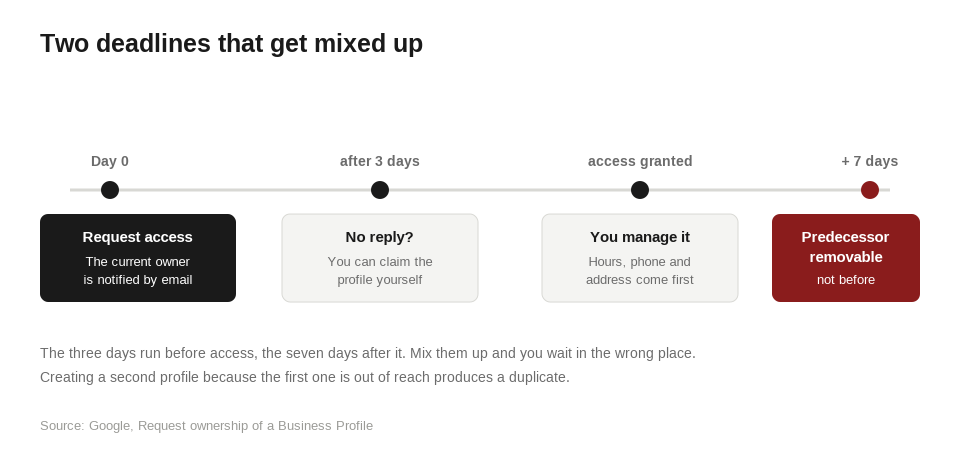
What follows is clearly timed: the current owner is notified by email and has three days to respond. If nobody reacts, Google states that you can then claim the profile yourself.
One limitation Google names explicitly: the claim option is not always available. In that case the route runs through support.
And one more deadline follows: as a new owner you can only remove your predecessor from the profile after seven days, more on that in who has access to your Google profile.
(Source: Google: Request ownership of a Business Profile)
What you should not do is create a second profile because the first one is temporarily out of reach. The result is a duplicate that splits reviews across two listings and has to be merged later, see our article on duplicate Google profiles.
Your predecessor’s reviews stay
This is the part that hurts most, and the part Google says least about.
The help pages on ownership and on editing a profile say nothing about what happens to existing reviews when the owner changes. Nor do they offer a route to have reviews removed simply because the operator changed. In practice that means they stay with the profile, average included.
What gets removed is what breaks the policies, and a change of operator does not. Which grounds actually work is covered in our article on getting a Google review removed.
So the route is not deletion but displacement. Google weighs newer reviews more heavily, and a steady flow across months changes two things at once: the average, and what guests read at the top.
Make the change visible
Guests forgive a new team the reputation of the old one, as soon as they notice it is a new team. That takes no apology for the past.
Take a position in your replies. An older complaint can be answered factually, noting that the venue has been under new ownership since a given date and that this specific point has changed. That is not an excuse, it is context for everyone reading along.
Visibly renew the profile. New photos, new description, current menu. A profile that looks like your predecessor’s gets read as your predecessor’s.
Ask for reviews early. The first weeks after a takeover are the most valuable, because the guests who come experience the difference directly. Which moments work is covered in our article on getting more Google reviews. Much of it resembles an opening, see our article on a new restaurant’s first Google reviews.
Name, category, concept: one after another
If the venue is getting a new name, that name belongs in the profile. Google notes that a name change after verification may make re-verification necessary.
So keep the order rather than switching everything on day one: ownership first, then core details, then name and category, then photos and description. Several large edits at once raise the chance of triggering a review, see our article on a suspended Google Business Profile.
The timeline
| Point in time | What to do |
|---|---|
| Before the handover | Ask your predecessor for the Google access, it costs nothing and saves weeks |
| Week 1 | Request access, wait out the three-day window, then claim it |
| Once granted | Check opening hours, phone, address, only then name and category |
| Weeks 2 to 4 | Renew photos and description, reply to the older reviews |
| Months 1 to 6 | Collect reviews actively, answer every one, keep the frequency |
The first row has by far the best effort-to-effect ratio: while the handover is still friendly, your predecessor can transfer ownership themselves in two minutes.
The bottom line
In a takeover you inherit the profile along with its history, and that history cannot be deleted. What can be changed is everything after it: claim access rather than starting over, renew the details and the look, make the change visible in your replies, and collect new reviews from day one. Making sure every review gets a timely answer that sounds like you and not like your predecessor is what SupaPresence handles for restaurants. Join the pilot for free.
Frequently Asked Questions
How do I get access to my predecessor’s profile?
Through Request access: find the business on Google, select it, fill in the form and submit. The current owner is notified by email and has three days to respond. If no reply comes, you can claim the profile yourself, though that option is not always available.
Should I just create a new profile instead?
No, not if it is the same venue at the same address. A second profile creates a duplicate, splits the signals, and has to be merged later anyway. The route runs through ownership of the existing profile.
Can I have my predecessor’s reviews removed?
Not simply because the owner changed. Google removes reviews for policy violations, and a change of operator is not one. The reviews stay with the profile, and the route runs through new reviews and through your replies.
Can I change the name on the profile?
Yes, if the venue genuinely has a new name. Google notes that changing the name after verification may require verifying again. Do not change everything on the same day, work through it step by step.
How quickly does the old impression fade?
Not through deletion but through volume and recency. Google weighs newer reviews more heavily, and a steady flow across months shifts both the average and what guests read first.