Seasonal Closures in Your Google Profile
Past seven days a different status applies: how seasonal venues handle the off-season in their Google profile without giving away visibility
The mountain hut shuts in mid-April, the lido at the end of September, the wine tavern takes six weeks off. In the Google profile everything stays as it was at peak season: hours from Tuesday to Sunday, phone line live, menu as in July.
The result is calls into the void and reviews that have nothing to do with the food, only with a locked door. Google has a dedicated status for this, and a surprisingly specific threshold for it.
The seven-day rule
This is where most businesses take the wrong turn. Google distinguishes by duration:
- Up to seven days: enter special hours, the profile stays open
- More than seven days, during the off-season, or for an indefinite period: set the status to temporarily closed
Google describes the point of it plainly: customers should see that you are temporarily unavailable, rather than standing in front of locked doors.
(Source: Google: Mark your business as closed)
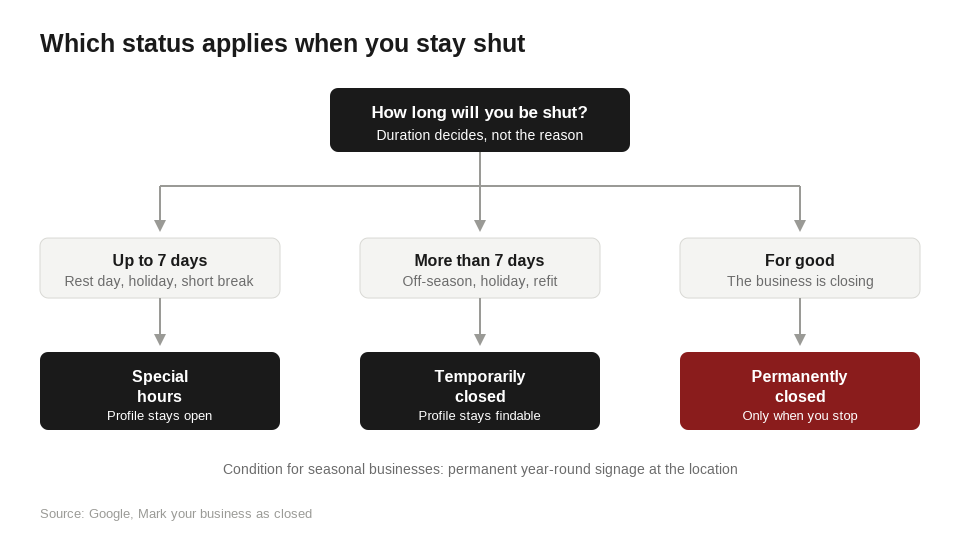
Permanently closed is the wrong status
The most common mistake, and it looks like a trifle. Permanently closed is meant for businesses that no longer exist. Setting it over the winter effectively reports your closure for good.
The profile may remain visible in search and Maps, but Google then clearly flags the business as closed. For a seasonal venue reopening in May, that is the worst possible presentation.
The saving grace: a location wrongly marked as permanently closed can be reopened.
Is a seasonal business allowed a profile at all?
Yes, and Google names the case explicitly. Seasonal businesses, with ice rinks given as the example, may have a listing if permanent year-round signage exists at the location.
So the condition is not a detail: the sign has to stay up even when nobody is there for months. Take the signage down over the winter and you remove the basis for the listing.
(Source: Google: Business Profile guidelines)
What happens to visibility in the off-season
A reassurance many are not aware of: a temporarily closed business can still appear among open businesses for general search queries. How high up depends, according to Google, on factors including category and query.
So the profile does not vanish. It simply says honestly that you are shut right now, and that is the difference between a guest who saves themselves the trip and a guest who stands at the door and writes about it on Google.
Which status when
| Situation | Right route |
|---|---|
| Rest day, public holiday, three days off | Special hours, profile stays open |
| Two weeks of holiday closure | Temporarily closed |
| Winter break, off-season | Temporarily closed |
| Refurbishment with an open end date | Temporarily closed |
| The business is closing for good | Permanently closed |
| Several locations at once | Select them in the dashboard, set the status via Actions |
For several locations this works as a bulk action, more on the structure behind it in our article on Google profiles for multiple locations.
Reopening is the more important date
Closing usually gets entered, reopening often gets forgotten. Yet that moment decides whether the first weeks work.
- Reset the status a few days before your first opening day, not on the morning itself
- Check the new season’s hours, they almost always differ from last year
- Update photos and menu, the winter shots do not match the terrace
- Use posts for the season opening, see our article on seasonal Google visibility
- Start collecting reviews again, after months off the flow has dried up, and Google weighs recent reviews more heavily
After a long break, restarting feels like opening, and part of the mechanics is the same, see our article on a new restaurant’s first Google reviews.
The bottom line
Seasonal businesses and Google get along fine, as long as the status matches reality: special hours up to seven days, temporarily closed beyond that, permanently closed only when you actually stop. The rest is timing, above all when reopening. Making sure the reviews come back quickly afterwards and every one gets a reply is what SupaPresence handles for restaurants. Join the pilot for free.
Frequently Asked Questions
When should I switch to temporarily closed?
Google gives a clear threshold: if the business stays shut for more than seven days, during the off-season, or for an indefinite period, set the status to temporarily closed. Up to seven days, special hours are enough.
Is a seasonal business even allowed a Google profile?
Yes. Google names seasonal businesses explicitly as permitted, on condition that permanent year-round signage exists at the location. The sign has to stay up outside the season too.
How is that different from permanently closed?
Permanently closed is meant for businesses that no longer exist. Setting it over the winter uses the wrong status. The profile may stay visible, but Google clearly flags that the business is closed.
Am I invisible during the off-season?
No. According to Google, a temporarily closed business can still appear among open businesses for general search queries. How high up depends on factors including category and query.
How do I reopen the profile for the new season?
Through the same route in your profile, the status can be set back to open. A location wrongly marked as permanently closed can be corrected the same way. Plan it a few days before your first opening day.