Taking Control of Ordering Links on Google
Delivery platforms land on your profile automatically: how to add your own ordering link, set a preferred provider and get unwanted links removed
A guest looks up your restaurant, taps Order, and lands on a delivery platform. The order does arrive, but with commission attached, and nobody at your venue ever set up that link.
Ordering links are the part of the profile Google fills most heavily from outside. There is still more you can steer than most people realise.
Where the external links come from
Google states it openly: third-party providers that state they have an authorised business relationship with your business are automatically listed on your profile.
The decisive word is state. It is enough for the provider to claim such a relationship, typically because your venue is listed with them. Your active consent is not required, which is why links appear that nobody at the business ever set up.
(Source: Google: Manage online ordering options)
Three levers you control
In the ordering section Google names three things a business can steer: adding and managing third-party services and your own ordering links, setting a preferred provider, and removing specific third-party services from the profile.
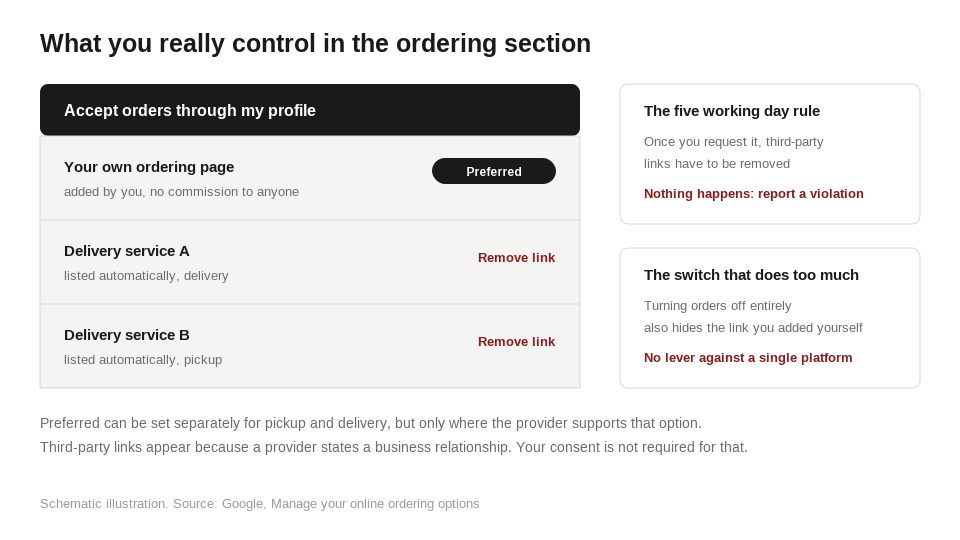
Add your own link. Alongside the automatically listed providers there are explicitly links that you add. These send guests to your own ordering page, with no commission to anyone else.
Set a preferred provider. For pickup and delivery, options and links from third-party providers can be marked as preferred. This works separately for pickup and delivery, but only where the provider supports that option.
Remove external links. That is the part with the most leverage, see below.
The five-business-day rule
Here is the sentence that never comes up in a conversation with a platform: once a business has made such a request, third-party links have to be removed from the profile within five business days.
The route runs through Remove link in your profile. If nothing happens afterwards, Google points to the option of reporting a violation.
That is not a request, it is a deadline. Anyone who has had a platform link on their profile for years without ever wanting it now has a concrete route and a date to point to.
The switch that turns off too much
The obvious idea is simply to disable ordering through the profile entirely. Google describes the consequence precisely: when the option to accept orders on your profile is turned off, the delivery options you added and the links from third-party providers are hidden on your Business Profile.
That includes your own link. As a tool against a single platform the switch is useless, it merely removes ordering from your profile altogether.
What makes sense when
| Situation | Right route |
|---|---|
| You have your own ordering page | Add your own link and mark it preferred |
| A platform link sits there unasked | Remove link, five business days apply |
| Removal does not happen | Report a violation through the form |
| You deliver through one platform only | Mark it preferred, remove the others |
| You take no online orders at all | Disable ordering through the profile |
The same mechanism, external providers inside your own profile, shows up with reservations too, see our article on table reservations via Google Maps. And the wider question of what your own site is worth is covered in restaurant website or Google profile.
What Google leaves open
Two points are not on the help page, so do not rely on them:
- A cap on the number of links is not stated there
- What happens on reactivation, after ordering has been switched off, is left open. The wording speaks of hiding rather than deleting, but it is not spelled out
The German version of the page also notes that parts may be AI-translated, and it names the same menu differently in two places. When in doubt, check the English version.
The bottom line
The links on your profile do not belong to the platforms by default, however much it feels that way. Add your own link, mark it preferred, and have unwanted third-party links removed citing the five-business-day rule: that is an hour of work and it pays off on every order afterwards. Keeping the profile maintained alongside, and every review answered, is what SupaPresence handles for restaurants. Join the pilot for free.
Frequently Asked Questions
Why are third-party delivery services on my Google profile?
Because Google lists them automatically. In Google’s words, third-party providers that state they have an authorised business relationship with your business are automatically listed on your profile. You do not have to have agreed to it.
Can I add my own ordering link?
Yes. Alongside the automatically listed providers there are links you add yourself, through Add link in the ordering section. That sends guests to your own ordering page instead of a platform.
Can I decide which provider appears first?
Yes. For pickup and delivery you can mark options and links as preferred, separately for pickup and delivery services. The option only exists where the provider supports it.
How do I get rid of a third-party link?
Through Remove link in your profile. Google states a deadline for it: once a business has made such a request, third-party links have to be removed from the profile within five business days. If nothing happens, you can report a violation.
What happens if I switch ordering off entirely?
Then the delivery options you added and the third-party provider links are hidden on your profile. That includes your own link, so the switch is not a tool against individual platforms.