Who Has Access to Your Google Profile?
Owner or manager, the seven-day lock for new owners, and why the chef who left two years ago may still be able to change your opening hours today
The chef who left two years ago can probably still change your opening hours. So, most likely, can the agency you stopped working with last summer. And nobody in the building knows exactly who is on the profile.
Access rights are the part of a Google profile you set up once and never look at again. Yet they decide who can change your data, and who could lock you out.
Two roles, one decisive difference
Google has exactly two roles, and they differ in only two respects.
Owners have full control over the profile according to Google: add or remove users, manage profile information, and delete the profile. There can be several owners but only one primary owner.
Managers, previously called site managers, have essentially the same access rights as owners. The one exception is that they cannot add or remove users and cannot delete the profile.
For everyday work that means: editing, replying to reviews and managing posts are open to both. Authority over who else has access sits with the owner alone.
(Source: Google: Manage owners and managers of your Business Profile)
The seven-day lock hardly anyone knows
This one surprises people above all during takeovers. Anyone who becomes an owner or manager of a profile has to wait seven days before managing certain profile functions.
Three things are locked during that period:
- deleting or restoring the profile
- removing other owners or managers
- transferring primary ownership
In practice: someone who has just taken over a venue and wants to remove the previous operator from the profile can only do so a week later. What else matters in a takeover is covered in our article on taking over a venue and its Google profile.
One more detail from the same rule: anyone who deletes their account within those first seven days is removed from the profile and has to be added again.
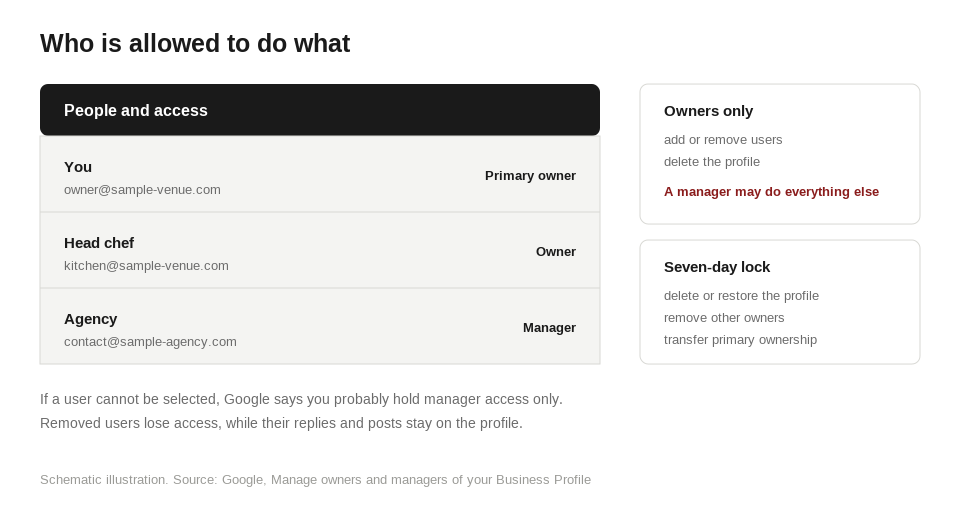
Who can remove whom
The route runs through the profile, three-dot menu, Business Profile settings, People and access, select the user, remove.
- Only owners can remove others. If you cannot select a user, you probably have manager access only
- Anyone can remove themselves, by choosing to stop managing the profile
- The primary owner can only leave after transferring primary ownership to someone else
- A profile needs at least one other owner or manager for primary ownership to pass to
Reassuring for anyone hesitating: removed users can no longer change anything, but their replies to reviews, posts and comments stay on the profile. You lose no work by taking someone off.
The roles at a glance
| Action | Owner | Manager |
|---|---|---|
| Edit profile information | Yes | Yes |
| Reply to reviews | Yes | Yes |
| Manage posts | Yes | Yes |
| Add or remove users | Yes | No |
| Delete the profile | Yes | No |
| Remove themselves | Yes, primary owner only after transferring | Yes |
From which follows the practical rule of thumb: agencies, part-timers and social media help get manager, not owner. The role is entirely sufficient for daily work and rules out anyone bricking the door on their way out.
The case Google does not cover
What happens when the only owner is unreachable or has lost the account? The help page on roles says nothing about it.
In practice the route is then the same procedure as in a takeover: request ownership, the current owner has three days to respond, after which you can claim it yourself. That is more work than any prevention, which is exactly why the following routine pays off.
Fifteen minutes of hygiene a year
- Go through People and access once a year and remove everyone no longer with the business
- Set up at least two owners, so one lost account does not block the whole profile
- Attach access to company accounts, not to individuals’ private addresses, see also our article on Google profiles for multiple locations
- Remove people when they leave, not at the next spring clean
- Check the profile after changes, since larger edits can trigger a review, see suspended Google Business Profile
The bottom line
Access rights cost a quarter of an hour once a year and prevent the situation where you can no longer manage your own profile. Two owners, managers for everyone else, and removal on the day someone leaves. Making sure the daily work on the profile runs reliably afterwards, reviews included, is what SupaPresence handles for restaurants. Join the pilot for free.
Frequently Asked Questions
Which roles exist on a Google Business Profile?
Two: owner and manager. Owners have full control, can add or remove users and delete the profile. Managers have essentially the same rights but cannot manage users and cannot delete the profile.
Why can I not delete anything as a new owner?
Because of a waiting period. According to Google, anyone who becomes an owner or manager has to wait seven days before they can delete or restore the profile, remove other owners, or transfer primary ownership.
Can a manager remove themselves?
Yes, through People and access, selecting themselves and choosing to stop managing the profile. Only owners can remove other users. The primary owner can only leave after transferring primary ownership.
Do replies disappear when I remove someone?
No. Removed users can no longer change anything, but their replies to reviews, their posts and comments remain on the profile.
What if the only access is lost?
Google’s help page on roles says nothing about this. In practice the route runs through requesting ownership, as in a business takeover, including the three-day window for the current owner.