Table Reservations via Google Maps: How to Set It Up
Table reservations straight from Google Maps: the two official ways to enable the booking button, costs, the waitlist, and requirements people overlook
A guest searches on their phone at eight in the evening for a table tonight, finds your profile in Google Search, and right underneath it a “Reserve a table” button. Two taps later the table is booked, no phone call, no need to even leave Google. Without that button, the same guest just keeps searching until they find a place where it works.
The button itself takes only minutes to set up. What most guides skip over are the two genuinely different paths to get there, and the requirements that ultimately decide whether it shows up at all.
What the Google booking feature actually does
The feature Google internally calls “Reserve with Google” surfaces a booking button directly in Google Search and Google Maps as soon as someone finds your profile. The guest stays entirely inside Google, there is no detour through your website or an external booking page that first has to load.
For you, that means an additional booking channel that sits exactly where many guests search first: inside Google Search itself, not on your website. How much a complete category and profile setup pays off in general is covered in our article The Right Google Business Category for Restaurants.
Two ways to enable the booking button
Google’s official help describes two fundamentally different paths, and they lead to noticeably different results.
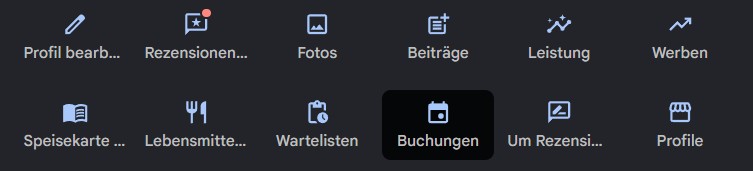
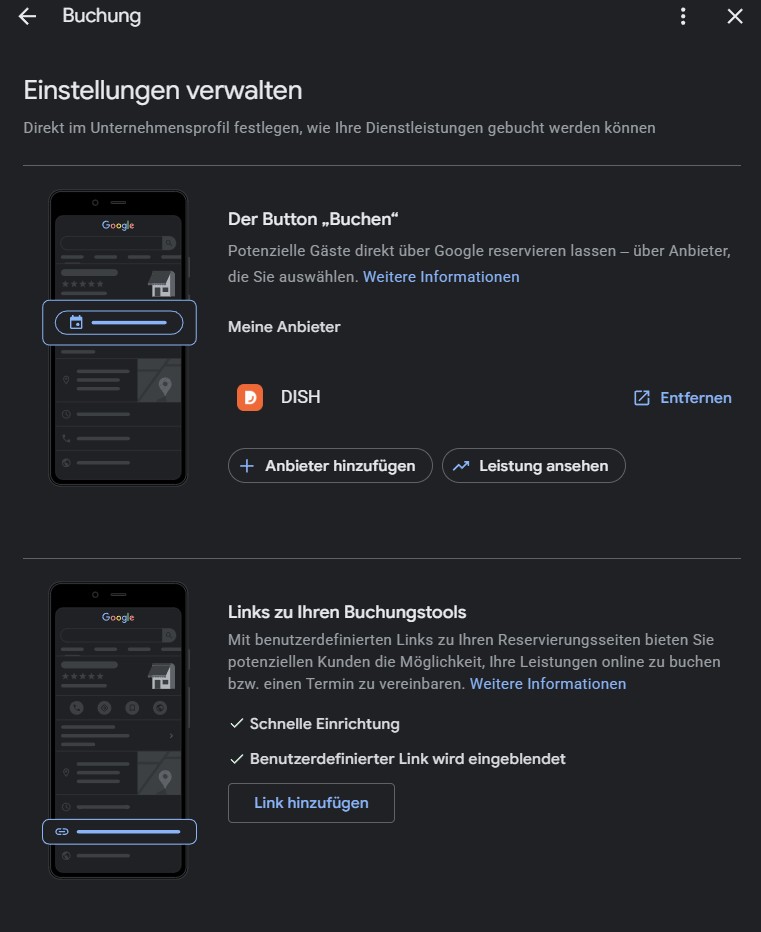
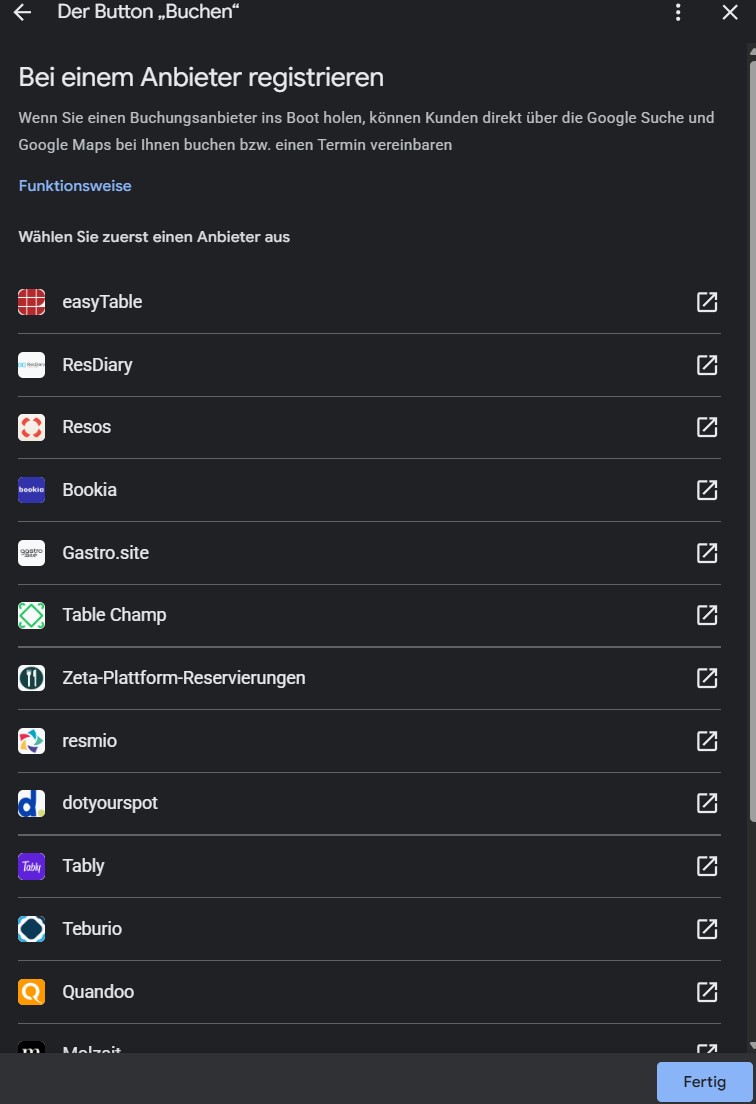
Path 1: A Reserve with Google partner. In the “Bookings” section of your profile, select “Get started” and pick one of the providers officially integrated with Google. Google’s own partner overview lists, among others, OpenTable, Resy, Yelp, Quandoo, Qudini, ResDiary, and resOS. Once set up, the button appears within about a week according to Google, and you also get performance statistics on bookings made through Google.
Path 2: A custom direct link. Instead, you simply add the URL of your existing booking page, whatever tool you use, with no official partnership required. This is faster to set up and works with practically any booking system, but it comes with no statistics from Google itself.
(Source: Set up bookings through a provider, Google Business Profile Help, Google Maps Reserve Partners)
Requirements people often overlook
Two things most commonly decide, in practice, whether the button shows up at all, regardless of which of the two paths you choose.
The category has to match the business. Several booking tool providers consistently report that the reserve button only appears on profiles categorised as a restaurant or a comparable dining business, the generic “Restaurant” category is enough, but an unrelated category is not. Google itself does not officially confirm this exact rule, but the pattern shows up across multiple independent guides. More on choosing the right category in our article The Right Google Business Category for Restaurants.
Name and address have to match exactly. Your booking system and your Google profile need to use the same name and address, letter for letter. A mismatched spelling, “St.” in the booking tool versus “Street” on the Google profile, can delay activation or block it entirely. Why this matters across every platform, not just here, is covered in our article NAP Consistency: Why It Matters for Local SEO.
Costs: Google charges nothing, your provider might
Google states explicitly in its own help documentation that the booking feature itself comes at no cost from Google. What your chosen provider charges for using its platform, booking fees, a subscription, a commission per reservation, depends entirely on that provider and has nothing to do with Google. It is worth checking a provider’s own pricing model before committing, not just its Google integration.
The waitlist as an add-on feature
Beyond standard reservations, Google also offers a waitlist feature for evenings that are already fully booked. Two restrictions apply: the feature is explicitly limited to restaurant businesses according to Google, and it only works through a Reserve with Google partner, not through the custom direct-link path. If you want the waitlist, there is no way around going through a partner.
Which path is worth it, and when
A custom direct link works well as a starting point if you already use a booking tool but are not ready to switch providers or enter a new partnership. It takes minutes to set up and works regardless of whether your tool is an official Google partner.
A Reserve with Google partner pays off once you care about statistics on bookings made through Google, or want to offer the waitlist. The extra setup effort is manageable, usually just activating the integration settings in your existing booking tool, provided it is one of the partners.
Using several booking platforms at once
Something many people don’t know: for restaurants, Google actually allows multiple booking providers in parallel, unlike most other appointment categories. Google describes it this way in its own policy: if several reservation providers are connected for the same restaurant, Google shows the guest all available providers to choose from at booking time, instead of forcing a single fixed one.
How this works technically: you sign up with several Reserve with Google partners at the same time, for example your existing provider plus a second one. Both sync their availability with your Google profile independently. There is no manual “switch”, once two partners are active, Google automatically decides to show both as options to the guest.
Advantages: guests who already have an account with a specific provider and prefer to book there don’t lose you as an option. If one platform goes down or a sync is delayed, the second one remains as a fallback. You are also not dependent on a single provider’s terms.
Disadvantages: you potentially pay for and manage two subscriptions instead of one, including two separate dashboards and logins. The biggest practical risk is table management itself: if both platforms don’t draw from the same central calendar, the same table could in theory be booked twice. Before signing up with a second provider, it is worth asking whether and how availability can be synced between the two systems.
Well-known reservation platforms in Europe
For the European market, beyond the internationally known names, these providers are especially widespread:
- TheFork: strong presence in France, Italy, Spain, and Portugal
- Zenchef: originally France, now active across Europe, merged with the previously separate platforms Formitable and Resengo in 2024
- Quandoo: widespread in German-speaking countries
- OpenTable: globally present, also active in several European markets
- ResDiary: widespread in the UK and Ireland
All of the providers listed are official Reserve with Google partners.
(Source: Reservations Business Link Platform Policies, Google Actions Center, Google Maps Reserve Partners)
Frequently Asked Questions
How do I enable table reservations on my Google Business Profile?
Open your Google Business Profile, go to the “Bookings” section, and select “Get started”. From there you can either choose a Reserve with Google partner or add your own link to your booking page.
What does the Google booking feature cost?
Google itself does not charge for the feature. Your booking provider may charge its own fees, that depends entirely on the provider, not on Google.
How long does it take for the reserve button to appear?
After activating it through a Reserve with Google partner, the button appears within about a week according to Google. A custom direct link is usually visible sooner, since no partner review is required.
Do I need a specific provider for the waitlist feature?
Yes, the waitlist feature is only available through a Reserve with Google partner, not through a custom direct link, and according to Google it is explicitly limited to restaurant businesses.
Why isn’t the reserve button showing up on my profile?
The most common causes according to booking tool providers: the profile’s category isn’t set to restaurant or a comparable dining category, or the name and address in the booking system don’t exactly match the Google profile.