Duplicate Google Profiles: How to Clean Up
Two listings, split reviews: how duplicates arise, what gets lost when you merge them, and what Google explicitly does not count as a duplicate
A guest sends you a link to your own restaurant, and it is the wrong one: 12 reviews, old opening hours, a photo of the building site. The correct listing with 80 reviews exists too, two rows further down in the same search.
Duplicates are almost never created deliberately, usually they appear during a move or a takeover, and they often sit unnoticed for years, because your own search reflex always finds the right profile.
Why two listings cost more than one
Google is unambiguous here: there can only be one Business Profile per business. Profiles marked as duplicates appear neither in search nor on Google Maps.
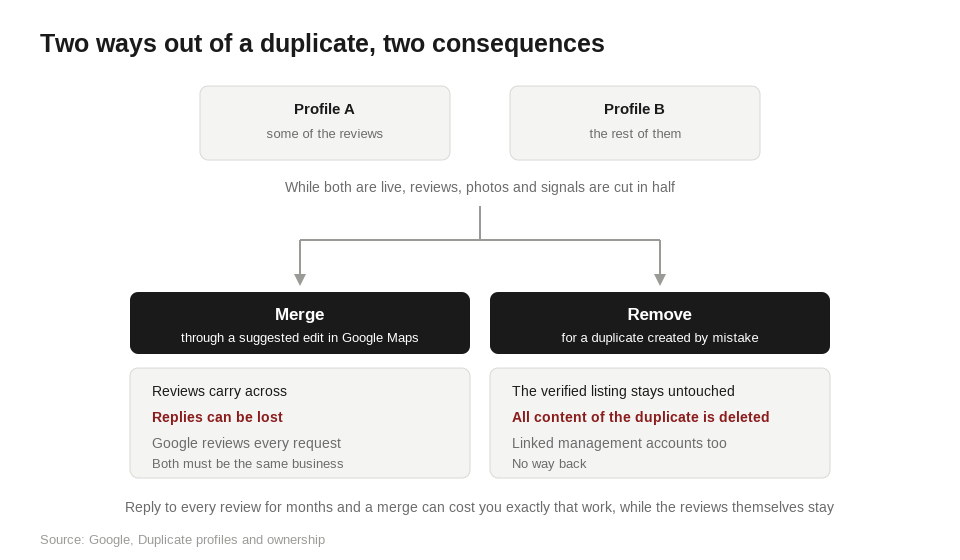
While both are live, they split everything that should belong together:
- Reviews spread across two listings instead of adding up into one body
- Photos and posts sit half here, half there
- Guests see contradictory details when only one profile is maintained
- The signals Google derives relevance from get halved
(Source: Google: Resolve duplicate profiles and ownership issues)
How duplicates come about
The move. The most common case and the most avoidable. Google says it plainly: on a move, update the existing profile with the new address rather than create a new one. Create a new one anyway and you now have two.
The takeover. The previous venue has a profile, the new concept gets one of its own. Both point at the same door. The right route for a takeover is covered in our article on taking over a venue and its Google profile.
A service as its own listing. Catering, lunch service, delivery: Google wants such services listed inside the existing profile, not as separate profiles.
Several people in charge. Agency, head chef and owner each create something independently, often spread over years.
What explicitly is not a duplicate
This part rescues businesses that have just been merged by mistake.
Several legitimate businesses at the same address with different names and clearly separate signage are permitted, for instance at multi-brand sites, after a rebrand, or for self-employed people with their own premises.
If Google has merged two separate businesses by mistake, you can appeal to support. Where both share a location, you need evidence of permanent signage that clearly names both businesses.
Cleaning up: merge or remove
Two routes, and the choice has consequences.
Merging runs through a suggested edit in Google Maps. Google reviews every request, the profiles have to represent the same business and contain the same information. Reviews are merged across in the process.
The catch almost nobody knows: merging can lose the replies to those reviews. Months of answering every review can disappear while the reviews themselves remain.
Removing suits a duplicate created in error and does not affect the verified listing. It does, however, delete all content and linked management accounts of the duplicate.
The order that saves trouble
- Put both profiles side by side: which has more reviews, which is verified, which carries the right address
- Save your replies before you start anything. Screenshots of the answered reviews will do, they may be the only copy
- Decide: both carry reviews, then merge. One is empty, then remove it
- After merging, check which replies are missing and rewrite them. The underlying pattern is in our article on responding to negative Google reviews
- Align your data so the next discrepancy does not appear, see our article on NAP consistency
At a glance
| Case | Right route |
|---|---|
| Two profiles, both with reviews | Merge, save the replies first |
| Empty listing created in error | Remove the duplicate |
| Relocation | Change the existing profile to the new address, do not create a new one |
| Catering or delivery as its own listing | List it as a service inside the existing profile |
| Two genuine businesses, merged by mistake | Appeal to support, evidence the signage |
| Several locations | One profile per location, see our article on multiple locations |
The bottom line
A duplicate costs you no suspension and no legal trouble, it simply costs you half of everything you have built. The clean-up takes an hour to set in motion, and the only part that has to happen first is saving your replies. Making sure every review gets a timely answer afterwards is what SupaPresence handles for restaurants. Join the pilot for free.
Frequently Asked Questions
Why is a duplicate Google profile a problem?
Because reviews, photos and signals split across two listings instead of adding up, and guests land on one or the other at random. Google allows only one profile per business, and profiles marked as duplicates appear neither in search nor on Maps.
Are reviews lost when profiles are merged?
The reviews themselves are merged across, according to Google. What can be lost are the replies to those reviews. If you have put work into replying, save them beforehand.
We moved, do we need a new profile?
No. Google states explicitly that on a move you should update the existing profile with the new address rather than create a new one. A newly created profile is the most common way duplicates come about in the first place.
We run two businesses at the same address, is that a duplicate?
Not automatically. Several legitimate businesses at one address with different names and clearly separate signage are permitted. If they were merged by mistake, you can appeal to support, which requires evidence of permanent signage naming both businesses.
Should I delete the duplicate or merge it?
Merge it if both profiles carry reviews. Delete only an empty listing created in error, because removing a duplicate deletes all of its content and linked management accounts.